Wednesday, December 1, 2010

Java Tutorial #13

0
Do-While Loop in Java
It will first execute a body of codes before testing for a condition.  Its general equation is:

do{
statements;
}while(condition);

Where:
condition = is where the loop will stop.

You maybe find this very similar to the while loop (because I use the same problem) but as we move on you will see their differences.  But for now, the obvious difference is that the while loop will test first for a condition then execute a command while do-while will execute a command first before testing for a condition.  Consider this example.


Java Tutorial #12

0
While Loop in Java
It’s general equation is:

while(condition){
Statements;
}

Where
Condition = is where the loop stop.
while keyword allows you to execute a blocks of commands by writing only one block of code for it.  Consider this example, 


Java Tutorial #11

0
For Loop in Java
The for statement is one of the useful statement in Java.  The for keyword has three arguments.  The first is where you want to start the Loop (INITIALIZATION), the second is where you want to end the Loop (CONDITION), and the last argument is how much you want to increment to value(INCREMENT).  Its general equation is:

for(INITIALIZATION, CONDITION, INCREMENT){
Statements;
}

NOTE: Variable++ will only increment a value of 1.  Variable+=value will increment a specific value which is greater than 1.

Consider this example


Java Tutorial #10

0
The Switch Statement in Java
The switch statement syntax is also the same as the C++.  It’s general syntax is:

switch(variable){

                case value1:
                Statements;
                break;

                case value2:
                Statements;
                break;


                default:
                Statements;
                break;
}

Where:
variable =  is the variable you want to switch
value1, value2 = is a Boolean value.   It can’t be a target of conditions.  It must be a numeral value not a character nor a string.

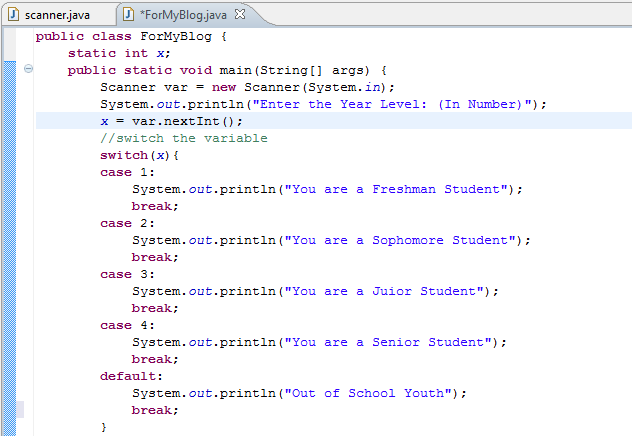
The switch statement is the enhanced version of if statement.  You maybe find it similar to if statement but switch statement is much more different to if statement.  The switch statement cannot be a target to any conditions of values.  The case can’t be a target of conditions to a value.  So, if you are about to use a conditions, still it is a good idea to use if-else if-else statement.   Consider this program.


Java Tutorial #9

0
The If Statement in Java
The Basic Syntax of if statement in C++ is:

if(condition/s){
Statements;
}
elseif(condition/s){
Statements;
}
else{
Statements;
}

But this Syntax will not work in Java.  The new syntax of if statement in Java is:

if(condition/s){
Statements;
}
if(condition/s){
Statements;
}

In this first syntax, multiple ifs is acceptable to Java.  But if you like to implement the general concept of if-elseif-else statement (which is very similar to c++) to your Java Program, you can still use it using this syntax.

if(condition/s){
Statements;
}
else if(condition/s){
Statements;
}
else if(condition/s){
Statements;
}
else(condition/s){
Statements;
}

 Consider this example.


Java Tutorial #8

0
More of the Scanner Topic

This is another example of the Scanner Topic.  This time the Scanner will store a double value.  Consider this simple program. 
How this program works?
First the program will ask for a first number to add.  After you enter the first number,  It will ask you again to input a value which will be the second number to be add.  After, you enter the second value, the program will add the two values and display the result to the console.


TO THE CONSOLE, It will display this..


Saturday, November 27, 2010

Java Tutorial #7

0
The Java's Scanner


Java Scanner is used to store variables and string you inputted in the console.  For example, the program requires you to put/type any number.  The string or the number you inputted in the console is being stored by the the Scanner.  So that later your program can access the data you inputted.  In able to use the Scanner you must import it to your Program (at the top part of your program see the first picture below) just type "import java.util.Scanner;".


Now, you have imported the Scanner in your program, you can now assign a name into that Scanner just type the word "Scanner scannername = new Scanner(System.in);". Note that you can have any name for the scannername.  Any character is qualify for a ScannerName.  


Now, we created a new Scanner.  The question is how we can access the data inside it.
In order to access information inside that scanner, first call the variable you stored to that scanner, put the equal sign then second put the scannername ,put the dot symbol (.) and type one of the ff keyword 

nextLine( );  --->  If variable is a String or a Character.
next( ); ---->  If you want to leave the cursor the last letter of the String.
nextInt( ); --->  If the variable is an Integer.
nextDouble( ); --->  If the variable is a float/double Value.

(ex. variable = scannername.nextInt( ); if the variable is an Integer)

For example, a program that will ask you to enter your name and then it will output the greeting "Hello " plus your name.  Later, your name will be stored in the Scanner then the program will access/process the information you inputted and add the word "Hello  " to it. Consider this example.